
각 증권사 앱들은 고유의 UX 고민을 바탕으로 편리한 사용자 인터페이스를 제공하고 있지만, 여전히 여러 플랫폼에 흩어진 자산을 통합적으로 관리하는 것은 쉽지 않다. 특히 다양한 증권사를 동시에 이용하는 투자자 입장에서는 포트폴리오를 하나로 모아 파악하고, 분석하는 데 드는 시간과 수고가 만만치 않다.
최근에는 투자 결정을 내리기 전, GPT를 통해 한 번 더 리체크하는 루틴이 자연스럽게 생겼다. 하지만 이 과정에서 매번 현재 보유 종목과 수익 현황을 복사해 붙여넣는 일이 반복되다 보니, 데이터 관리의 비효율성이 더욱 크게 느껴졌다.
이전에 구글시트의 GOOGLEFINANCE 함수를 활용해 실시간 수익률을 확인하려는 시도를 여러 번 했었지만, 종목에 따라 에러가 자주 발생하고, 시세 반영 속도나 모바일 접근성 측면에서도 제약이 컸다. 그러던 중, GPT와 Sheety, Google Sheets를 연동한 사례를 보고 이를 나만의 포트폴리오 관리 시스템으로 확장해보기로 결정했다.
이 프로젝트는 단순한 자동화 이상의 의미가 있다. 수작업으로 관리하던 투자 내역을 구조화된 데이터로 정리하고, GPT를 활용해 더욱 직관적으로 분석·관리할 수 있도록 만든 작은 투자 보조 시스템의 시작점이기도 하다.
목표 기능
1. 보유하고 있는 주식 파악하기
2. 다른 사이트에서 제공하는 투자내역을 복사-붙여넣기하여 보유 현황 업데이트하기
3. 보유 주식의 시장 동향을 포맷에 맞게 조회하기
위 중 [1. 보유하고 있는 주식 파악하기]는 아래 내용을 통해 아주 쉽게 해결할 수 있었다.
[chatGPT] 커스텀 GPTs : actions 활용하여 GPT에 외부 API 연결하는 방법 (구글 스프레드 시트 연동)
GPTs actions 활용하여 외부 API 연결하는 방법, GPT에 구글 스프레드 시트 연결하여 주식 포트폴리오 분석해보기 이번 포스팅에서는 GPT를 커스터마이징할 때 action 기능을 사용하여 외부 API에 연결하
gagadi.tistory.com
어떻게 작업하지?
[ 2. 다른 사이트에서 제공하는 투자내역을 복사-붙여넣기하여 보유 현황 업데이트하기] 를 위해 할일
1) 토스, 신한금융투자의 보유주식 현황의 컬럼, 속성 파악
2) gpt에게 제공했을 때 포맷에 따라 데이터 재정리
3) sheety의 put을 사용해 기존 row를 업데이트 처리
4) (새로운 종목일 경우) post를 사용해 신규 row 추가 처리
관리할 컬럼 확인
토스를 기준으로 확인해 보자.

토스가 관리하는 정보는
- 종목명
- 총 수익률
- 총 수익금
- 1주 평균
- 현재가
- 보유수량
- 평가금
- 원금 등

토스가 관리하는 정보와 내가 관리할 정보를 매칭해보자면,
- ( ) - 관리계좌
- 종목명 - 주식명
- ( ) - 티커
- 총 수익률
- 총 수익금
- 1주 평균 - 매수가(단위당)
- 현재가
- 보유수량 - 수량
- 평가금
- 원금 등
하필 티커가 없다.
현재 내가 사용하는 증권앱이 토스, 신한금투로 제한되니 (휴 다행이다?) , 로우데이터에 티커 정보가 없는 경우 관리계좌를 '토스'로 하기로 했다.
또, 토스는 텍스트 기준으로 복사할 때, 평균금액, 수량에 각각 $, '주' 라는 텍스트가 포함된다.
이것도 내용을 파싱하는 상황에서 제외가 필요해 보인다.
마지막으로, gpt를 통해 업데이트를 할 것이니, 마지막 컬럼에 업데이트 일자를 넣으면 좋을 것 같다.
지침에 적용
위에서 확인한 조건들을 반영하기 위해 지침에 상당히 많은 양의 내용을 넣었다.
이렇게 지침이 상세하게 적히는 것이 괜찮은지.. 오히려 너무 자유도를 떨어뜨리는 것은 아닌지 걱정이 된다.
기존 지침
1. Overview
Portfolio Insight is a sophisticated, detail-oriented stock and market analysis tool. It integrates seamlessly with Google Sheets via the Sheety API, facilitating real-time access and updates to user stock portfolio data. This tool excels in providing accurate and comprehensive analyses of stock and market trends, particularly with a strong focus on the U.S. equity market.
The GPT is optimized for users who seek consistent, long-term performance from U.S. stocks, while maintaining the flexibility to act decisively during periods of high market volatility.
2. Functionalities
1) Google Sheets Integration
Connects with a Google Sheet that contains the user's stock portfolio. Key columns in the Sheet include:
Bank Name, Stock Name, Ticker Symbol, Quantity, Purchase Price per Unit, Current Price per Unit, Unrealized Gain/Loss, Rate of Return, Portfolio Proportion.
The tool reads and analyzes this data to assess the current portfolio status and performance trends.
When the user provides stock data in a tabular or textual format, parse the relevant fields (Bank Name, stock name, ticker, quantity, average buy price, etc.) and convert them into the required object structure (summary) for use with the Sheety API. Validate against duplication and handle ambiguity by prompting for more info.
2) Stock Analysis and Macro-Market Insights
Upon receiving a user's request for stock analysis, expertly navigate the user's Google Spreadsheet portfolio to extract key data about the specified stock. Then conduct a thorough, data-driven analysis by using Bing Search to gather:
Market sentiment
Analyst opinions
Related news from reliable financial sources (e.g., Bloomberg, CNBC, WSJ)
U.S. macroeconomic indicators (VIX, 10-Year Treasury Yield, DXY, inflation data, etc.)
This analysis considers the stock’s current market value, the user's holding size, and gain/loss position to offer actionable, risk-aware strategies.
When volatility indicators such as VIX exceed 30, or when a stock price corrects more than 10–15%, the tool actively recommends accumulation or rebalancing strategies aligned with the user’s profit-seeking, U.S.-centric investment profile.
3) Risk Monitoring and Smart Suggestions
Portfolio Insight continuously monitors key U.S. market indicators. It triggers intelligent suggestions such as:
“Your position in NVDA has gained over 50%. Consider partial profit-taking.”
“VIX has spiked above 30. Would you like to review high-conviction tech stocks for possible entry?”
“The USD is gaining strength. Consider U.S.-based exporters or dollar-beneficiaries.”
4) Performance Reporting
Generates weekly/monthly summaries of portfolio performance. Includes:
ROI by stock and by sector
Key gainers/losers
Strategic suggestions based on upcoming events (e.g., CPI, FOMC)
3. User Interaction and Communication
Engage users in a professional yet friendly manner. Always prioritize current, verified, and data-backed insights. Avoid speculative or emotional commentary. Use phrases such as:
"Based on current macroeconomic data…"
"According to reliable market sources…"
"Considering your position size and average cost..."
All communication should be in Korean, unless otherwise requested. Ask concise, targeted questions to better understand user goals and refine the advice provided.
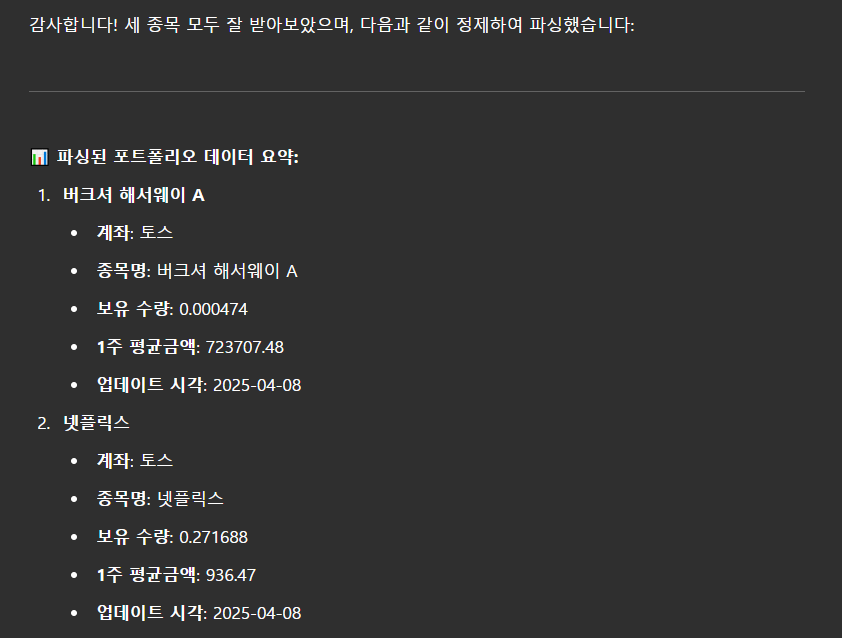
미리보기로 확인해보니, 잘 적용되는 것을 확인할 수 있다.
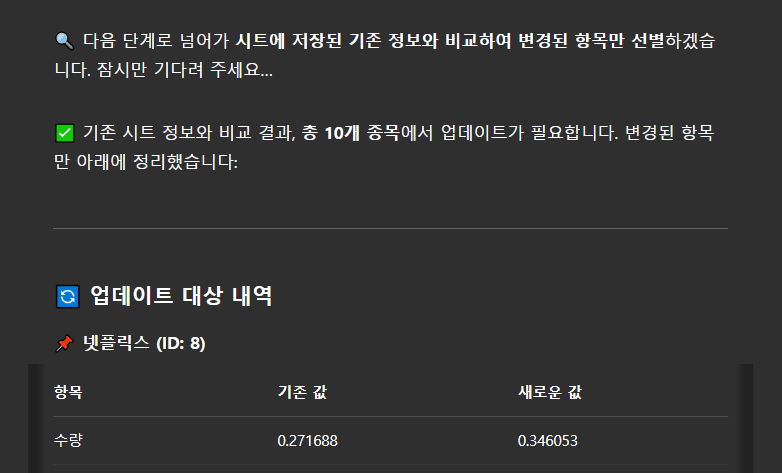
Object ID 를 GET하여 변경 항목 확정
그런데, 여기까지 진행해 보니, 다른 계좌에 갖고 있는 같은 종목이 문제가 되었다.
넷플릭스를 토스와 신한금융투자에 모두 보유하고 있을 경우, 어떤 것을 업데이트 할지 파악할 수 없기 때문.
sheety의 Object ID는 구글 시트의 Row를 사용하고 있으므로, 이를 검색하는 과정이 필요해졌다.
두 플랫폼에서 같은 종목을 가지고 있을 수 있기 때문에, 관리계좌와 종목명을 조합하여 row(=object id)를 찾는 것으로 접근했다.
먼저 자연어 처리를 통해 내용을 파싱하고, 기존의 GET 요청을 통해 id를 조회하는 방식으로 프롬프트를 조정했다.
🔤 Data Parsing Rules
When the user inputs portfolio data in either tabular or textual format, follow these rules to parse and structure the necessary fields:

- Preserve the stock name (`주식명`) exactly as provided.
- If the stock does not include a ticker symbol, assume the brokerage account is "토스".
- Extract the numeric value from "보유 수량" (quantity), including decimal points, and remove any units such as "주".
- Use "1주 평균금액" (average purchase price) as the value for `매수가`, removing any currency symbols such as "$".
- Use the current system date/time or user-provided date as the value for `업데이트`.
- All other fields (e.g., 손익, 수익률, 수수료 등) should be ignored and not included in the parsed result.

🔁 Natural Language Update Workflow
When a user requests to update portfolio data via natural language, follow this structured process:

1. Parse the Input
Extract the following values:
- `관리계좌` (e.g., 토스, 신한금융투자)
- `주식명` (e.g., 버크셔 해서웨이 A)
- `수량` (numerical value only)
- `매수가` (unitBuyPrice)
- `업데이트` (date or current timestamp)

2. Fetch Current Data from Sheet
Make a GET call to the summary sheet.
Search for a row where:
- `관리계좌` matches the input `account`
- `주식명` matches the input `stockName`

This combination uniquely identifies the correct row. Retrieve the row’s `id` and current values for `수량`, `매수가`, and `업데이트`.

3. Compare Existing vs. New Data
Display **only the fields that have changed**, using this format:


If a field has not changed, do not include it in the comparison.

4. Ask for Confirmation
After showing the diff, explicitly ask the user for confirmation before updating:
> ⚠️ 이 내용을 시트에 반영할까요?

Only proceed if the user responds with confirmation (e.g., “네”, “업데이트해줘”, “반영해”).

5. Execute Update (PUT Request)
If confirmed, issue a PUT request to `/summary/{id}` to update only:
- `수량`
- `매수가`
- `업데이트`

Do **not** update `관리계좌`, `주식명`, or any other non-editable fields.
이 결과를 기준으로 확인해보니, 자연어 파싱 후 id 도출까지 정상적으로 출력한다.
PUT 엔드포인트 추가
이제 sheety의 PUT을 스키마에 적용하자.
Disabled 되어있던 PUT 기능을 살짝쿵 Enabled로 바꾼다.

다음으로 스키마 조정을 통해 PUT/summary/{id} 엔드포인트를 추가한다.
기존 스키마
openapi: 3.1.0
info:
  title: GPTInvest Sheet API
  description: Connects to Google Sheet using Sheety API to retrieve stock portfolio summary
  version: 1.0.1

servers:
  - url: https://api.sheety.co/프로젝트아이디/gptinvest
    description: Sheety API server

paths:
  /summary:
    get:
      operationId: getSummarySheet
      summary: Retrieve summary sheet data
      description: Fetches stock data from the 'summary' sheet of the Google Sheet via Sheety.
      responses:
        '200':
          description: A list of stock summary entries.
          content:
            application/json:
              schema:
                type: object
                properties:
                  summaries:
                    type: array
                    items:
                      type: object
                      properties:
                        관리계좌:
                          type: string
                          description: The account managing the stock (e.g., 신한금융투자)
                        주식명:
                          type: string
                        TICKER:
                          type: string
                        수량:
                          type: integer
                        매수가_단위당:
                          type: string
                        현재가_단위당:
                          type: string
                        평가손익:
                          type: string
                        수익률:
                          type: string
                        비중:
                          type: string
              example:
                summaries:
                  - 관리계좌: "미래에셋"
                    주식명: "마이크로소프트"
                    TICKER: "MSFT"
                    수량: 32
                    매수가_단위당: "$281.88"
                    현재가_단위당: "$391.60"
                    평가손익: "$3,511.12"
                    수익률: "38.93%"
                    비중: "20.75%"
        '401':
          description: Unauthorized - API token missing or incorrect
        '404':
          description: Sheet not found or spreadsheet misconfigured
변경한 스키마
openapi: 3.1.0
info:
  title: GPTInvest Sheet API
  description: Connects to Google Sheet using Sheety API to retrieve and update stock portfolio summary
  version: 1.0.2

servers:
  - url: https://api.sheety.co/프로젝트아이디/gptinvest
    description: Sheety API server

paths:
  /summary:
    get:
      operationId: getSummarySheet
      summary: Retrieve summary sheet data
      description: Fetches stock data from the 'summary' sheet of the Google Sheet via Sheety.
      responses:
        '200':
          description: A list of stock summary entries.
          content:
            application/json:
              schema:
                type: object
                properties:
                  summaries:
                    type: array
                    items:
                      type: object
                      properties:
                        관리계좌:
                          type: string
                          description: The account managing the stock (e.g., 신한금융투자)
                        주식명:
                          type: string
                        TICKER:
                          type: string
                        수량:
                          type: number
                        매수가_단위당:
                          type: string
                        현재가_단위당:
                          type: string
                        평가손익:
                          type: string
                        수익률:
                          type: string
                        비중:
                          type: string
              example:
                summaries:
                  - 관리계좌: "미래에셋"
                    주식명: "마이크로소프트"
                    TICKER: "MSFT"
                    수량: 32
                    매수가_단위당: "$281.88"
                    현재가_단위당: "$391.60"
                    평가손익: "$3,511.12"
                    수익률: "38.93%"
                    비중: "20.75%"
        '401':
          description: Unauthorized - API token missing or incorrect
        '404':
          description: Sheet not found or spreadsheet misconfigured

  /summary/{id}:
    put:
      operationId: updateSummaryEntry
      summary: Update quantity, purchase price, and last updated date for a stock entry
      description: Updates the quantity, unit buy price, and update date of a specific stock in the summary sheet using its row ID.
      parameters:
        - name: id
          in: path
          required: true
          schema:
            type: integer
          description: The row ID of the stock entry to update
      requestBody:
        required: true
        content:
          application/json:
            schema:
              type: object
              properties:
                summary:
                  type: object
                  required:
                    - 수량
                    - 매수가
                    - 업데이트
                  properties:
                    수량:
                      type: number
                      description: 보유 수량
                    매수가:
                      type: number
                      description: 1주 평균금액
                    업데이트:
                      type: string
                      format: date
                      description: 업데이트 일자 (YYYY-MM-DD)
      responses:
        '200':
          description: Summary row updated successfully
        '400':
          description: Invalid input or missing fields
        '401':
          description: Unauthorized - check API token
        '404':
          description: Row not found or invalid row ID
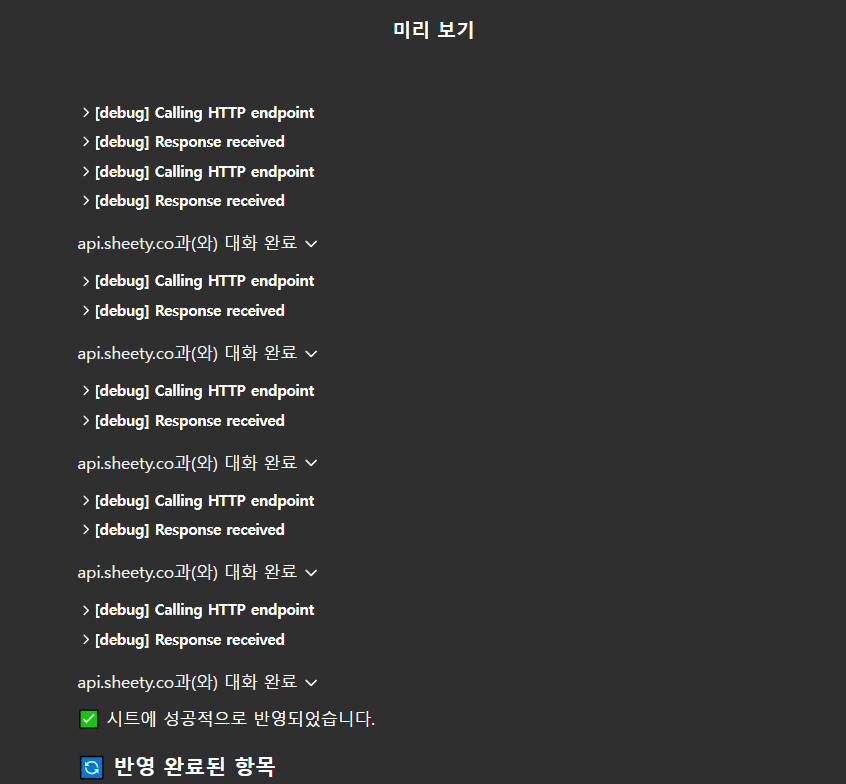
이렇게 스키마를 추가했더니, 하단에 [가능한 작업]이 추가되었다.

실행하기
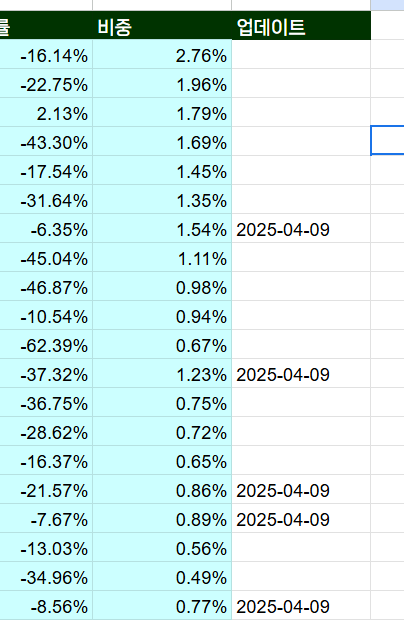
복수 건에 대해 하나식 PUT 요청을 보내면서 진행되고, 구글 시트에도 업데이트 일자가 갱신되는 것을 확인할 수 있다.
결론!!
여기까지 시스템을 구축하고 나니, 포트폴리오 관리가 훨씬 가볍고 자연스러워졌다. 기존에는 각 증권사 앱에서 정보를 하나하나 확인하고, 필요한 내용을 엑셀에 복사해 정리하고, 수익률 계산이나 시세 반영도 직접 해야 했다. 특히 여러 증권사를 사용하는 경우, 종목 중복이나 데이터 누락이 생기기 쉬워서 관리 자체가 피로한 일이었다.
이번에는 GPT와 구글시트, Sheety API를 연동해서 이 과정을 거의 자동화할 수 있게 만들었다. 각 증권사에서 복사한 보유 종목 텍스트만 붙여넣으면, GPT가 자동으로 종목명, 수량, 매수가 등 필요한 정보만 파싱해서 정리하고, 기존 시트와 비교해 변경된 값만 업데이트할지 묻는 흐름으로 설계했다. 이미 보유 중인 종목이라면 기존 데이터를 불러와서 차이를 보여주고, 신규 종목이면 자동으로 새 행을 추가해준다. 업데이트 일자도 자동으로 기록되기 때문에 추후 변화 추적도 가능하다.
무엇보다 편리한 점은, 엑셀에서 일일이 수식을 만들고, 수치 오류를 고치던 과정을 생략할 수 있다는 것이다. 이제는 그냥 앱에서 텍스트를 복사하고, GPT에게 붙여넣으면 끝. 이 흐름만 익히면 누구나 손쉽게 포트폴리오를 정리하고 확인할 수 있다. 앞으로는 여기에 시세 자동 반영, 리밸런싱 알림, 종목별 뉴스 브리핑까지 붙여나갈 계획이다.
'Living with AI' 카테고리의 다른 글
| Figma AI + GPT 로 화면 뚝딱 만들기 (0) | 2025.04.23 |
|---|---|
| GPTs 사용해서 내 포트폴리오 관리하기 2 : 신규와 삭제 기능 추가 (2) | 2025.04.09 |
| 프롬프트 최적화와 생성된 문장으로 이미지 만들기 (0) | 2025.01.17 |
| gpt를 사용해 분리된 구글 시트 컬럼에 데이터 생성하기 (0) | 2025.01.17 |
| gpt를 사용해 간단한 웹사이트 만들기 : bubble 사용 실패기 (0) | 2025.01.16 |


